
Introducing CrashLab: a ready-to-boot hardware-hacking lab for Raspberry Pi

CrashLab is Symbol Crash’s custom Raspberry Pi OS Desktop (64-bit) image for our monthly hardware-hacking workshop—and for anyone who wants the same bench stack without spending a weekend installing OpenOCD, SDR tools, ChipWhisperer, flash programmers, and a pile of udev rules.

Boot it, plug in a probe, and open the CrashLab Guide. Decision trees walk you from “unknown board on the bench” through serial, JTAG/SWD, flash dumps, RF, side-channel, and more, with buttons that launch the right tools on the Pi.

CrashLab desktop on Raspberry Pi OS with neon purple wallpaper, CrashLab logo, and CrashLab Guide launcher
CrashLab desktop — neon branding, Welcome note, and CrashLab Guide on the Desktop.

Download: huggingface.co/buckets/awgh/crashlab

What you get

CrashLab is built on official Raspberry Pi OS Desktop (arm64) with workshop packages and docs preinstalled:

  • Debug: OpenOCD, GDB (gdb-multiarch), pyOCD, probe-rs, ST-Link tools
  • Serial / logic: picocom, PulseView / sigrok, Saleae Logic 2
  • Flash / programmers: flashrom, minipro (TL866 / XGecu), esptool, stm32flash, PlatformIO (preseeded platforms)
  • SDR / RF: GNU Radio, Gqrx, SoapySDR, RTL-SDR, HackRF, USRP/UHD helpers, rtl_433, inspectrum
  • Side-channel: ChipWhisperer Lite + Nano (Python/Jupyter env ready)
  • FPGA lite: yosys, nextpnr-ice40, openFPGALoader (iCEBreaker-style boards)
  • RE helpers: binwalk, rizin, squashfs / JFFS2 / UBI unpack tools
  • Mesh / bus: Meshtastic CLI, CAN (can-utils), MQTT / net helpers
  • On-image docs: interactive CrashLab Guide, labs under ~/CrashLab/labs/, offline ISA manuals (ARM, x86, RISC-V, ESP32, AVR, OpenOCD, STM32)

USB udev rules cover the usual workshop kit (FTDI, ST-Link, CMSIS-DAP, J-Link, Saleae, TL866, NewAE, SDR sticks, Pico, Espressif, CANable, and more).
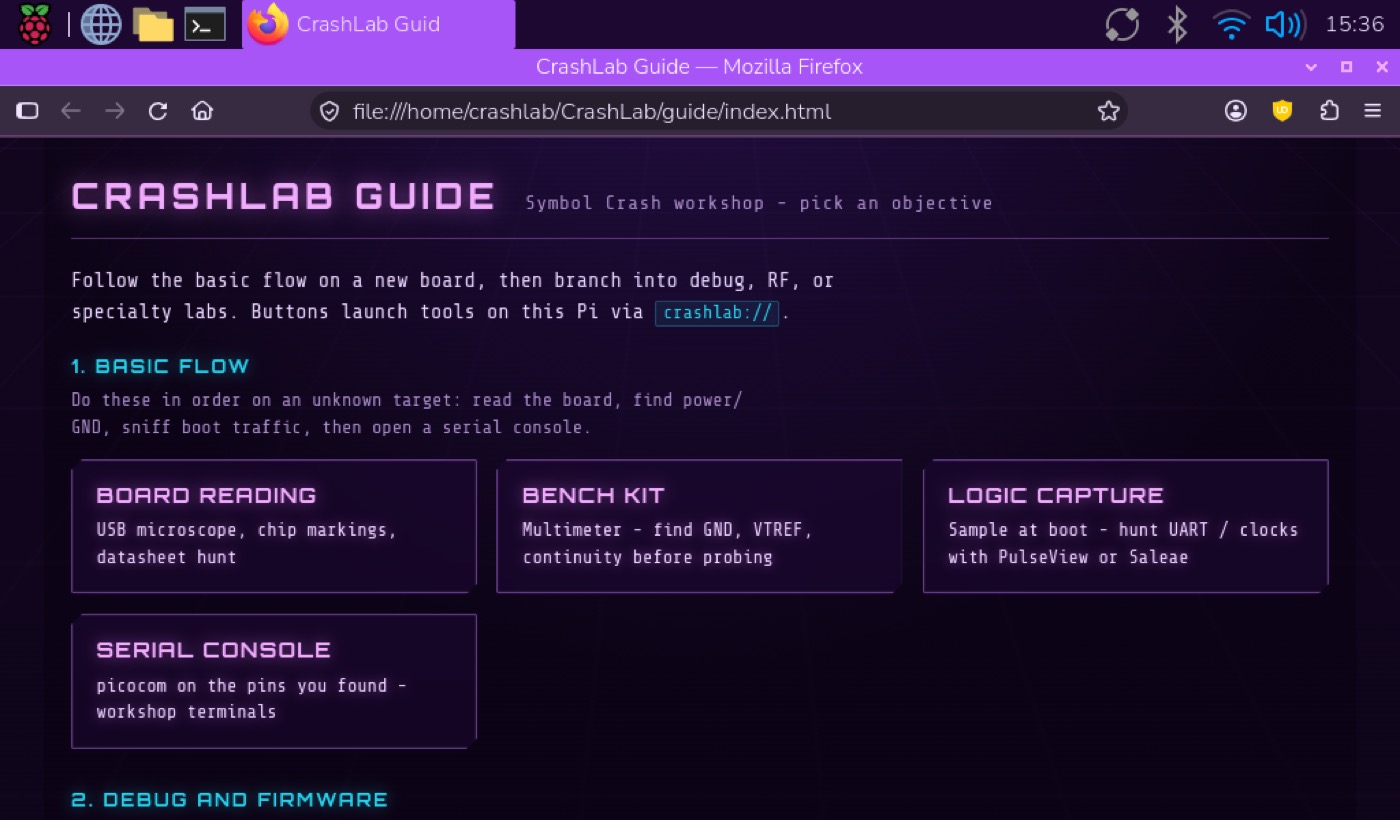
CrashLab Guide hub in Firefox showing Basic Flow cards for board reading, bench kit, logic capture, and serial console
The offline CrashLab Guide — pick an objective; buttons launch tools via crashlab://.

Supported Raspberry Pi hardware

CrashLab is an arm64 image. Use a 64-bit-capable board with a microSD (8 GB+; 16–32 GB is comfortable for workshop use):

BoardNotes
Raspberry Pi 5Preferred for desktop + Saleae / CW
Raspberry Pi 4Solid all-around workshop host
Raspberry Pi 3 / 3+Works; keep expectations modest for heavy GUI tools
Raspberry Pi Zero 2 WCompact host; prefer lighter workflows
Compute Module (arm64)Supported where you already run Pi OS Desktop

Default login:

Hostnamecrashlab
Usercrashlab
Passwordcrashlab

Change the password if the Pi leaves the workshop bench.

SSH is enabled; desktop autologin is on for LightDM/labwc workshop convenience.
CrashLab neon purple synthwave wallpaper with logo and Symbol Crash wordmark
Stock CrashLab wallpaper (also used as the Plymouth splash motif).

Workshop targets and gear

Practice targets (on-image labs)

TargetWhat you practice
BluePill (STM32F103)SWD with Adafruit FT232H, UART beacon, pin-timing / physical-security style labs, optional probe firmware, RDP Level 1 dump path
Diebold AccuVote-TSx (PXA255)FT232H JTAG stack: wiring, dump, two-pass reflash, eBoot GDB, CompactFlash side quest

Common adapters and instruments (udev + helpers ready)

CategoryExamples
Debug adaptersST-Link V2/V3, Adafruit FT232H (MPSSE JTAG/SWD), CMSIS-DAP, J-Link
Logic analyzersSaleae Logic, PulseView / sigrok
Chip programmersTL866II+, XGecu T48 / T56 (minipro)
SDRRTL-SDR, HackRF One, USRP B200/B210-class
Side-channelChipWhisperer Lite and Nano
Pin discoveryJTAGulator
Wi-Fi / mesh / CANAlfa USB Wi-Fi (monitor mode), Meshtastic USB nodes, CANable / candleLight
FPGAiCE40 boards (e.g. iCEBreaker)
Board readingUSB UVC microscopes (crashlab-microscope)

On the image, run crashlab-matrix or open What is plugged in? in the Guide for live USB status and suggested next steps.

Tilix four-pane CrashLab Workshop terminals for serial, OpenOCD, GDB, and docs
CrashLab Workshop Terminals — serial · OpenOCD · GDB · docs in one Tilix window.

Download CrashLab

Browse the public Hugging Face Storage Bucket:

https://huggingface.co/buckets/awgh/crashlab

Grab these two files (the bucket overwrites them on each publish so “latest” is always the same names):

  1. CrashLab-arm64.img.xz — compressed disk image
  2. CrashLab-arm64.sha256 — checksums

Option A — browser

Use the Hub UI, or the direct resolve URL:

https://huggingface.co/buckets/awgh/crashlab/resolve/CrashLab-arm64.img.xz

Also download CrashLab-arm64.sha256 from the same bucket page.

Option B — Hugging Face CLI

hf buckets cp hf://buckets/awgh/crashlab/CrashLab-arm64.img.xz ./CrashLab-arm64.img.xz
hf buckets cp hf://buckets/awgh/crashlab/CrashLab-arm64.sha256 ./CrashLab-arm64.sha256
sha256sum -c CrashLab-arm64.sha256

(On macOS you can use shasum -a 256 -c CrashLab-arm64.sha256 if sha256sum is unavailable.)

Write the image to a microSD card

Easiest: Raspberry Pi Imager

  1. Install Raspberry Pi Imager.
  2. Choose Use custom / custom image and select CrashLab-arm64.img.xz (Imager can handle .xz).
  3. Select your microSD (double-check the drive — this erases the card).
  4. Write, eject, insert into the Pi, power on.

You do not need to apply Imager’s OS customization for the workshop defaults; the image already has user, hostname, and SSH configured. Change the password after first boot if needed.

Command line (dd)

Identify the SD device carefully (lsblk on Linux, diskutil list on macOS). Then:

# Linux example — replace /dev/sdX with your card (not a partition like sdX1)
xzcat CrashLab-arm64.img.xz | sudo dd of=/dev/sdX bs=4M status=progress conv=fsync

On macOS, unmount the volume first (diskutil unmountDisk /dev/diskN) and write to the raw device (/dev/rdiskN) if you prefer dd over Imager.

First boot and getting started

CrashLab Guide Serial console page with picocom examples and launch buttons
Guide decision tree for Serial console — commands and one-click workshop launchers.
  1. Connect HDMI, keyboard/mouse (or SSH once you know the LAN IP).
  2. Log in as crashlab / crashlab (or wait for desktop autologin).
  3. From the Desktop or application menu, open CrashLab Guide, or run:
    crashlab-guide
  4. Follow the basic flow on a new board: board reading → bench kit (GND / VTREF) → logic capture → serial console. Then branch into debug, flash, RF, ChipWhisperer, or a named target (BluePill / AccuVote).
  5. Optional helpers:
CommandPurpose
crashlab-matrixHardware matrix + live USB status
crashlab-tilix-workshopFour-pane serial / OpenOCD / GDB / docs
crashlab-sdrSDR stack shortcuts
crashlab-programmersTL866 / minipro helper

Docs and labs live under ~/CrashLab/. Offline reference PDFs are in ~/CrashLab/references/.

Links

Bring a Pi, a BluePill or AccuVote practice unit, and a FT232H or ST-Link—and you are on the bench in minutes instead of an evening of package hunting. See you at the next workshop.

The Grugq

In this episode of the Hack the Planet Podcast:

The Grugq shares stories from his 25 years at Phrack, with a special announcement about its future! We also dive into opsec, hacking at the systems level, origin stories, dealing with infosec burnout, and a surprising amount of information about fonts.

Links:

Phrack – http://www.phrack.org/

Between Two Nerds Podcast @ Risky.Biz – https://risky.biz/

List of Presentations – https://grugq.github.io/presentations/

OPSEC For Hackers: Because Jail is for wuftpd:

Systems Alchemy – https://www.youtube.com/watch?v=P6PnhDfWvx0

Grugq on Substack – https://grugq.substack.com/
Grugq on Twitter – https://x.com/thegrugq

Be a guest on the show! We want your hacker rants! Give us a call on the Hacker Helpline: PSTN 206-486-NARC (6272) and leave a message, or send an email to podcast@symbolcrash.com.

Original music produced by Symbol Crash. Warning: Some explicit language and adult themes.

Zachtronics

In this episode of the Hack the Planet Podcast:

We talk with Zach of Zachtronics, creator of some of the best video games of all time, about his philosophy of game design, the story of the creation of Exapunks, and the correct pronunciation of Shenzhen I/O.

Zachtronics – https://www.zachtronics.com/

Manuals & Zines – https://www.lulu.com/search?contributor=Zachtronics

Be a guest on the show! We want your hacker rants! Give us a call on the Hacker Helpline: PSTN 206-486-NARC (6272) and leave a message, or send an audio email to podcast@symbolcrash.com.

Original music produced by Symbol Crash. Warning: Some explicit language and adult themes.

Rocket Surgery with Arko

In this episode of the Hack the Planet Podcast:

We talk about making hardware that can survive in space with Arko, a robotics engineer and polymath hacker who has published open-source projects for high altitude balloons and autonomous vehicles, and revitalized the North American demo scene with his board for LayerOne. Other topics include growing up around the space program, the Nullspace hackerspace in LA, the ethics of self-driving cars, and what the amateur radio hobby called Summits on the Air has to do with avionics for spacecraft.

This episode could be a great introduction to designing avionics for spacecraft, for getting into the demoscene, or serve as an excuse to buy a bunch more radio equipment. If you are looking for as many as three new expensive hobbies, this is the episode for you.

Links:

Arko’s Project Site – http://www.arkorobotics.com/
Github – https://github.com/arkorobotics/

Arko @ UKHAS 2013 – https://www.youtube.com/watch?v=7ybIkH_u4as
UKHAS HabHub – http://habhub.org/
NullSpace – https://032.la/

LayerOne Demoscene Board – http://l1demo.org/wiki/start
Northern Dragons (demo group) – http://northerndragons.ca/
BBC MicroBot – https://twitter.com/bbcmicrobot

Summits on the Air – https://www.sota.org.uk/

Be a guest on the show! We want your hacker rants! Give us a call on the Hacker Helpline: PSTN 206-486-NARC (6272) and leave a message, or send an audio email to podcast@symbolcrash.com.

Original music produced by Symbol Crash. Warning: Some explicit language and adult themes.

Securing Hardware with Joe Fitz

In this episode of the Hack the Planet Podcast:

Joe Fitzpatrick of SecuringHardware.com is the best known hardware security trainer on the planet.  We talk to him about how he retargeted his hardware security training program to a remote audience and what he’s learned about designing hacker trainings over the years. We also discuss a new hardware hacking tool that Joe built for both training and real world use: the Tigard, available on Crowd Supply. Joe has also been prototyping a PCI Express multi-tool, the Epic Erebus, and we brainstormed some ways to get into trouble with one. As usual, we discuss his backstory and some additional projects including a drone-based taco delivery service.

Be a guest on the show! We want your hacker rants! Give us a call on the Hacker Helpline: PSTN 206-486-NARC (6272) and leave a message, or send an audio email to podcast@symbolcrash.com.

Original music produced by Symbol Crash. Warning: Some explicit language and adult themes.

SecuringHardware: https://securinghardware.com/

Tigard: https://www.crowdsupply.com/securinghw/tigard 

B-Sides PDX: https://bsidespdx.org/

Interview with Malware Unicorn

In this episode of the Hack the Planet Podcast:

We dive into reverse engineering and malware development with Malware Unicorn, red teamer and author of some of the best the malware development training on the internet. We discuss why MacOS is an interesting environment for malware, tips for building your own reverse engineering lab, and future trainings in the works. We recorded this episode before the latest training was released, but you can find Malware Unicorn’s portable executable injection study on her website linked below.

Links:

Malware Unicorn Workshops – https://malwareunicorn.org/#/workshops

Xori – https://i.blackhat.com/us-18/Wed-August-8/us-18-Rousseau-Finding-Xori-Malware-Analysis-Triage-With-Automated-Disassembly.pdf

Writing Bad @$$ Malware for OS X – https://www.slideshare.net/Synack/writing-bad-malware-for-os-x

lena151 Tutorials – https://archive.org/details/lena151

Flare-On Challenges – https://flare-on.com/

Joe Sandbox – https://www.joesandbox.com/

Universal Loader – https://github.com/Binject/universal
https://www.symbolcrash.com/2021/03/04/the-universal-loader-for-go/

Be a guest on the show! We want your hacker rants! Give us a call on the Hacker Helpline: PSTN 206-486-NARC (6272) and leave a message, or send an audio email to podcast@symbolcrash.com.

Original music produced by Symbol Crash. Warning: Some explicit language and adult themes.

Noid

In this episode of the Hack the Planet Podcast:

Noid is the former head of DEF CON security, founder of the LayerOne conference and the Black Lodge Research hackerspace, gunsmith, and anti-zombie technology enthusiast. We talk about the early history and social dynamics of BBS’s, the formation and growth of DEF CON, how to run a security team for unruly hackers in the middle of the desert, and why you shouldn’t go to DEF CON this year.

We also go into the formation of DC groups and the split from 2600, the formation of Black Lodge Research, and Noid’s artisanal hobbies including cooking and classic gun collecting.

Despite the advice of our guest, Hack the Planet will be attending DEF CON 29 in-person! Give us a call or drop us an email if you want to be interviewed for the show or meet up at the event!

Be a guest on the show! We want your hacker rants! Give us a call on the Hacker Helpline: PSTN 206-486-NARC (6272) and leave a message, or send an audio email to podcast@symbolcrash.com.

Original music produced by Symbol Crash. Warning: Some explicit language and adult themes.

Interview with Ilja van Sprundel

In this episode of the Hack the Planet Podcast:

We are joined by a master of C code audit, Ilja van Sprundel, Director of PenTest at IOActive and prolific public speaker. We ask him how he learned to be such a bad ass, including some epic stories from the past, and go over some of his recent areas of interest including IOMMU, bootloader, and kernel vulnerabilities.

Ilja’s Links:
An Offensive Approach to Teaching Information Security (Summer School):
http://sunsite.informatik.rwth-aachen.de/Publications/AIB/2005/2005-02.pdf
Netric (archive): https://web.archive.org/web/20050214135602/http://netric.org/

Things not to do when using an IOMMU: https://www.youtube.com/watch?v=p1HUpSkHcZ0
Boot2Root: https://www.youtube.com/watch?v=L7p5-ArFeYI
Memsad: https://www.youtube.com/watch?v=0WzjAKABSDk
BSD kernel vulns: https://media.ccc.de/v/34c3-8968-are_all_bsds_created_equally
Windows drivers: https://media.ccc.de/v/32c3-7510-windows_drivers_attack_surface
X Security: https://media.ccc.de/v/30C3_-5499–en–saal_1–201312291830–x_security-_ilja_van_sprundel
iOS Security: https://media.ccc.de/v/cccamp11-4490-ios_application_security-en
Hacking Smart Phones: https://media.ccc.de/v/27c3-4265-en-hacking_smart_phones

Daniel Stone, Wayland and X: https://www.youtube.com/watch?v=GWQh_DmDLKQ

GodBolt: https://godbolt.org/
SleuthKit: https://sleuthkit.org/
SourceInsight: https://www.sourceinsight.com/
sandsifter: https://github.com/xoreaxeaxeax/sandsifter

Be a guest on the show! We want your hacker rants! Give us a call on the Hacker Helpline: PSTN 206-486-NARC (6272) and leave a message, or send an audio email to podcast@symbolcrash.com.

Original music produced by Symbol Crash. Warning: Some explicit language and adult themes.

Interview with Eric Michaud

In this episode of the Hack the Planet Podcast:

We do an actual ingress episode, not like the game. We discuss all manner of physical entry techniques, from doors to cars to tamper evident containers, with Eric Michaud, co-founder of TOOOL US and CEO of RiftRecon.

Can you beat the drug test? Find out in this episode! We also discuss the evolution of the US hackerspace movement from its European roots and ponder the post-COVID future of hackerspaces.

Eric’s Links:
RiftRecon: https://www.riftrecon.com/
Gone in 60 Seconds: https://www.youtube.com/watch?v=G6VVuSkTAgg
Lemon Caper: https://www.youtube.com/watch?v=qL9kFOt8YW4
Security of Urine Drug Testing Paper: https://www.yumpu.com/en/document/view/37593335/the-security-of-urine-drug-testing-journal-of-drug-issues
TOOOL US: https://toool.us/
Open in 30 Seconds (talk): https://www.youtube.com/watch?v=iOIRZnafgQk
Open in 30 Seconds (book): https://www.amazon.com/OPEN-THIRTY-SECONDS-Cracking-America/dp/0975947923

Be a guest on the show! We want your hacker rants! Give us a call on the Hacker Helpline: PSTN 206-486-NARC (6272) and leave a message, or send an audio email to podcast@symbolcrash.com.

Original music produced by Symbol Crash. Warning: Some explicit language and adult themes.

The Universal Loader for Go

As promised in the previous post, Go Assembly on the arm64, I have been working on a very special project for the past couple months, and I’m very pleased to announce the Universal Loader!

This Golang library provides a consistent interface across all platforms for loading shared libraries from memory and without using CGO. When I say “all platforms”, I mean Linux, Windows, and OSX including the new M1 Apple chip.

Until someone tells me differently, I am claiming that this is the very first loader to work on the M1, Golang or not. I haven’t tried it myself yet, but it will likely also work on any POSIX system, like BSD variants, without changes. If you try this on a new platform, let me know!

Additionally, the Linux backend of the loader does not use memfd, and I believe this is the first Golang loader to do that as well. The Linux ramdisk implementation memfd is very easy to use, but it’s also relatively easy to detect.

Consistent Interface

On all platforms, this is a basic example of how to use Universal to load a shared library from memory and call an exported symbol inside it:

Just pass in your library as a byte array, call LoadLibrary on it and give it a name, then you can Call() any exported symbol in that library with whatever arguments you want.

All you have to do differently on a different platform is load the right type of library for your platform. On OSX, you would load myLibrary.dyld, on Linux myLibrary.so, and on Windows myLibrary.DLL.

Check out the examples/ folder in the repo and the tests for more details.

Algorithms and References

The Linux and Windows implementations are very straight-forward and based on the same basic algorithms that have been widely used for years, and I used malisal’s excellent repo as a reference, with some minor changes.

For the OSX loader, I referred heavily to MalwareUnicorn’s wonderful training, but I did have to make a few updates. For one thing, dyld is not guaranteed to be the next image in memory after the base image.

Also have to give a heartful thank you to C-Sto and lesnuages, who contributed code to the Windows and OSX loaders, respectively.

Last but not least, this library makes heavy use of our own fork of the debug library, so this would not have been possible without contributions over the years from the whole Binject crew, and it’s a perfect example of the power of the tools we’ve made.

This isn’t the first tool to come out of our work in Binject, and it definitely will not be the last.

Once you get locked into a serious m*****e collection, the tendency is to push it as far as you can.