We are joined in the studio by Vyrus and privacy researcher Will Scott to talk about the dual-edged sword of technology in the context of protests. We dive deep on technical innovations from the Black Lives Matter protests, especially in the areas of software defined radio and crowd-sourcing. Then things slide off the rails in the usual manner.
Be a guest on the show! We want your hacker rants! Give us a call on the Hacker Helpline: PSTN 206-486-NARC (6272) and leave a message, or send an audio email to podcast@symbolcrash.com.
Original music produced by Symbol Crash. Warning: Some explicit language and adult themes.
I have asthma, and the quicker we determine the right set biochemical properties of SARS-CoV-2 needed to develop an antiviral or vaccine at mass scale, the quicker I go back to some semblance of normal life. I’ll do quite a bit if I can to help the cause, which is why I’ve gone fairly deep on optimizing how I can increase my Folding@Home throughput. What follows is a whirlwind tour of the best ways I’ve found to increase folding performance, and by extension make my htop graphs look like this:
12 CPU folding threads and 1 GPU folding thread optimally scheduled
Folding@Home is a distributed computing project that simulates biological proteins as their atoms interact with each other. This involves a great number of floating point and vector operations. We’ve discussed this in detail on our previous podcast episode, “Fold, Baby, Fold.”
The high level strategies for increasing throughput include:
Optimizing thread scheduling
Reducing cache contention
Increasing instructions retired per cycle
Maximizing memory and I/O performance relative to NUMA layout
Eliminating wasteful overhead
Overclock Everything
This first point almost goes without saying: but overclock your CPU, your memory, and your GPU wherever possible without overheating or losing stability. (There’s an entirely separate post to be written about my heat management journey to date).
CPU Isolation
The rest of this post is gonna assume you’re in this to win this and willing to sacrifice nearly all of your computing cycles to the viral alchemical overlords who manage the big work unit in the sky. Me? I have 12 physical cores and 24 logical cores to work with on my Threadripper 1920x.
My normal usermode processes get 1 core: core 0. Why core 0? There are multiple IRQs that can’t be moved from that core, and it’s gonna have more context switches than the average core to begin with. Everything else is gonna be managed by me. I use the kernel boot arg “isolcpus=1-23”. I also set “nohz_full=1-23” to prevent the “scheduler tick” from running, which supposedly helps reduce context switches.
NUMA NUMA
It’s no longer 2004 and viral Europop pantomime videos are dead. It’s 2020 and consumer CPUs are letting some abstractions run a little closer to the physical layout of cores on die. Some of your cores might have priority access to one memory channel over another. Various devices on the PCI bus are also assigned priority access to certain cores. You can run the lstopo utility to check out your own configuration. Here’s mine:
Pay special attention to L3 cache layout and PCI device priority
In order for each node to properly be allocated half of the RAM in my system, I had to move one of my two DIMMs to the other side of the motherboard. This was discovered only after searching through random forum posts. There’s no great documentation here from AMD!
NUMA node #1 has access to the GPU on the PCI bus, so any threads managing GPU folding will be assigned to a core in that node.
Pinning the GPU Core
Folding@Home can give you work units to stress the CUDA cores on your overpriced GPU. You deserve to get the most out of your investment. In order to move data around all those CUDA cores, there’s one usermode thread that needs as much processing power as it can get. I pin my threads to logical cores 11 and 23 (both on NUMA node 1). Nothing else will run on those two logical cores (one physical core; logical core number modulo 12 is the physical core number for my Threadripper).
If you pin cores as above, that’s the single best way to improve GPU folding performance without tweaking a single GPU setting. You can do some stuff with renicing processes, but I couldn’t tell you how much that does compared to just giving a whole physical core to GPU folding.
CPU Pinning
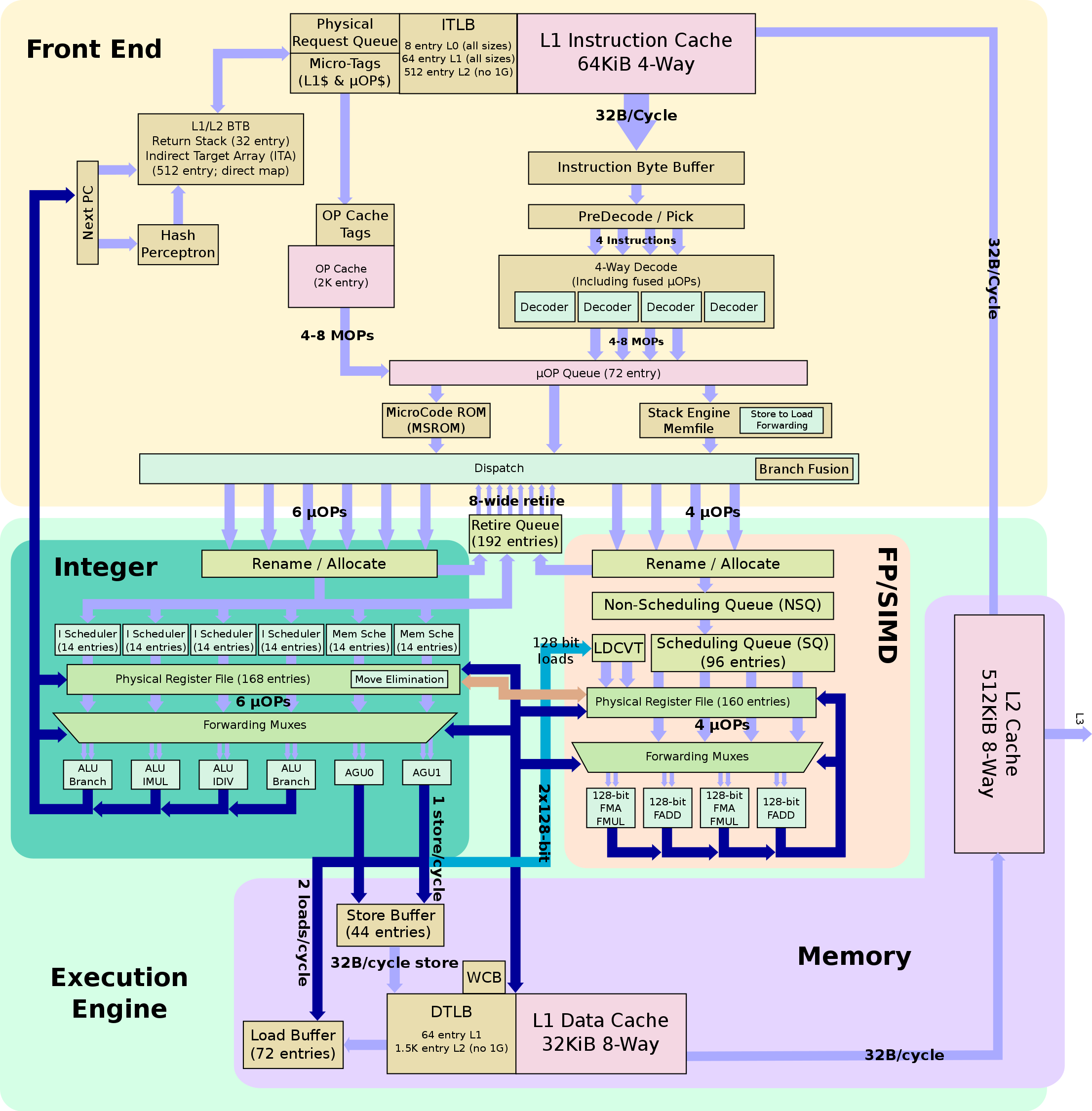
Hyperthreading is a convenient white lie. You can try and run two CPU folding threads on one physical core, but unless you have very specialized hardware chances are the floating point unit in each core is going to be a bottleneck that prevents you from actually getting double the performance. Here’s what the backend instruction pipeline looks for the Zen architecture, which is what each of the cores on my TR1920x is based on:
Four 128-bit floating point operations max per cycle on the Zen backend
You get a max of four 128-bit floating point operations per cycle. AVX256 instructions are 256 bits wide. That’s your bottleneck. Empirically, I’m not getting much better folding throughput per core by running 1 CPU thread versus 2. Your mileage may vary, but I’ve stuck with only scheduling 1 folding thread 1 CPU core per CPU core except where necessary.
Specifically, of logical cores 0-23, CPU folding currently occurs on core 8 and cores 12-22. I chose core 8 because it does not share an L3 cache with any cores that do GPU folding. I would like to keep L3 cache pressure as low as reasonably possible for those cores. This means physical core 8 (logical cores 8 and 20) has two CPU folding threads scheduled while every other physical core has at most 1. This, in my experience, has been a better arrangement than turning off hyperthreading/SMT in the BIOS settings.
Again, you can do some stuff with scheduler hints but again I can’t tell you if it’s worth it.
numactl
Linux processes can have hints for how to allocate new memory pages to a process relative to the the NUMA layout of a system. The one we want for CPU folding is “localalloc” which says that physical memory must be provided from the local NUMA node of the calling thread. This helps to ensure optimal memory performance. The easiest way to set this for a process is to use the numactl command.
Bypassing Needless Syscalls
If you are a writing a multithreaded application, one way you can have one thread wait for another to complete an action is to check as often as possible if that action is done yet. Another is to say “I’m gonna let some other thread do some work, wake me when it’s done and I’ll do another check.” The latter is what happens when you call the “sched_yield” syscall. Folding at Home CPU cores call that a lot. Probably to be nice to other processes (this is meant to be run in the background after all).
Do 11% of cycles really need to be spent in entry_SYSCALL_64?
The calls are initiated from userland via the sched_yield libc function which is a wrapper for the syscall. Because sched_yield is a dynamically loaded symbol, we can hook the loading with an appropriate LD_PRELOAD setting and force all calls to that function to immediately return 0 without ever yielding to the kernel. This empirically boosts folding throughput by a noticeable amount once you have threads pinned appropriately.
Disable Spectre Mitigations
Cycles spent on preventing Spectre attacks are cycles not spent folding proteins. There can be a non-trivial number of these cycles. The image above showed something like 7% of cycles spent in __x86_indirect_thunk_rax which is a Spectre mitigation construct.
Get rid of them by setting the “mitigations=off” kernel boot argument. Does this argument affect microcode, or do I need to downgrade microcode to fully disable mitigations? I don’t know–the documentation kinda sucks and I haven’t been able to find out!
Keep Your House in Order
Put kernel threads and IRQs on unused cores.
Keep your other usermode threads on core 0 unless you need more parallelism.
Putting It Together
Folding@Home distributes binary files named “FahCore_a7” and “FahCore_22” which nearly all folding work units are processed by. If you rename one to something like “FahCore_a7.orig” and replace the file on disk where “FahCore_a7” originally was with an executable shell script, you can run shell commands on the start of each new work unit. For example, you can set how the folding processes run without needing to poll for created processes. This also allows for LD_PRELOADing libraries into subprocesses.
Additionally, I run a shell script on a cron job set for every 10 minutes that ensures folding processes are properly pinned. A script moves kernel threads and IRQs to unused cores every half hour.
If you have a spare fuzzing rig or password cracker, running Folding@Home and optimizing thread scheduling is a great way to learn about how your kernel scheduler works. This can help you learn how to schedule threads for your workloads in order to maximize your iterations per second.
Additionally, this might give you some leverage to run untrusted workloads in a VM or container to mitigate Spectre without needing to take the performance hit of kernel mitigations (note we make no claims or warranties on this point).
The Linux perf tools allow for sampling of the behavior of a target thread without attaching a debugger.
Optimize for Throughput
The number 1 most predictive statistic for how well your optimizations are working is “the change over time in how long it takes the Folding@Home logs to update percent complete.” I’ve been running tail -F /var/lib/fahclient/log.txt and counting the average delta between timestamp updates for a given work unit. There are other stats you can try and optimize for, like instructions retired per cycle as reported by perf stat, but that can be misleading if you start over-optimizing for that. Note that when you restart the Folding@Home client, the first reported update in percentage complete needs to be ignored (a work unit can be checkpointed in between percentage updates).
Although these techniques were developed on a Threadripper, they apply to all the Intel Core series laptops I have scattered around my apartment running Folding@Home. You’ll know you’re making progress when the amount of time red bars are visible on htop CPU graphs significantly changes.
A Parting Message
Finally, you can help Symbol Crash help protein researchers by registering your client with folding team 244374. Remember that if you register for a user passkey you are eligible for a quick return bonus.
This post is a bit terse, but that’s because half the fun is building a mental model of how all the pieces fit together! Here’s a thread documenting some of my intermediate progress. The intro to our DMA special has some backstory on this whole effort.
If you have any follow up questions or want to rave about your own performance, you can call the Hacker HelpLine at (206) 486-6272 or send an email to podcast@symbolcrash.com to be featured on an upcoming episode of Hack the Planet!
We chat with mubix about the infamous QuickCreds script, writing games in your boot sector, Hak5, and the joys of teaching … and cheating at video games.
Be a guest on the show! We want your hacker rants! Give us a call on the Hacker Helpline: PSTN 206-486-NARC (6272) and leave a message, or send an audio email to podcast@symbolcrash.com.
Original music produced by Symbol Crash. Warning: Some explicit language and adult themes.
backdoorfactory setting up the man-in-the-middle with bettercap and injecting a binary inside of a tar.gz as it’s being downloaded by wget (courtesy of sblip)
About six years ago, during a conversation with a red teamer friend of mine, I received “The Look”. You know the look I’m talking about. It’s the one that keeps you reading every PoC and threat feed and hacker blog trying to avoid. That look that says “What rock have you been under, buddy? Literally everyone already knows about this.”
In this case, my transgression was my ignorance of The Backdoor Factory.
The Backdoor Factory was released by Josh Pitts in 2013 and took the red teaming world by storm. It let you set up a network man-in-the-middle attack using ettercap and then intercept any files downloaded over the web and inject platform-appropriate shellcode into them automatically.
Man-in-the-Middle Attack Using ARP Spoofing
In the days before binary signing was widely enforced and wifi security was even worse than it is now, this was BALLER. People were using this right and left to intercept installer downloads, pop boxes, and get on corpnet (via wifi) or escalate (via ARP). It was like a rap video, or that scene in Goodfellas before the shit hits the fan.
But nothing lasts forever. Operating systems made some subtle changes and entropy took over, and so the age of The Backdoor Factory came to an end. Some time later, the thing actually stopped working and red teamers sadly packed up their shit and lumbered off to the fields of Jenkins.
Fear not, gentle reader, for our tale does not end here.
For some reason, a year and change back, I found myself once again needing something very much like The Backdoor Factory and stumbled on this “end of support” announcement. Perhaps still motivated by my shameful ignorance years ago, I thought “maybe I owe this thing something for all the good times” and took a look into the code to see if something could be fixed easily.
No, no it couldn’t. Not at all. But the general design and the vast majority of the logic was all in there. It worked alongside ettercap to do ARP spoofing, then intercepted file downloads, determined what format they were, selected an appropriate shellcode if one was available, and then had a bunch of different configurable methods to inject shellcode into all binary formats.
…It’s just that it was heaps and heaps of prototype-grade Python and byte-banged files. I have heard a rumor, similar to On The Road, that the original version had been written in a single night. It clearly was going to take longer than that to port this to something maintainable, but… I mean… automatic backdooring of downloaded files! This needed to happen. This needed to be a capability that red teamers just had available in the future. Fuck entropy.
For each of the abstract areas of functionality from the original, we made a separate Go library. The shellcode repository functions went into shellcode. The logic that handles how to inject shellcode into different binary formats went into binjection. To replace the binary parsing and writing logic, we forked the standard Golang debug library, which already parsed all binary formats, and we simply added the ability to write modified files back out.
This gives us a powerful tool to write binary analysis and modification programs in Go. All of these components work together to re-implement the original functionality of BDF, but since they’ve been broken into separate libraries, they can be re-used in other programs easily.
Finally, to replace the ailing ettercap, we used bettercap, the new Golang replacement, which supports both ARP spoofing and DNS poisoning attacks. bettercap allows for extension “caplet” scripts using an embedded Javascript interpreter, so we wrote the Binject caplet that intercepts file downloads and sends them to our local backdoorfactory service for injection via a named pipe and then passes the injected files along to the original downloader.
The flow of a file through the components of the Backdoor Factory, on its journey to infection
Injection methods have been updated to work on current OS versions for Mach-O, PE, and ELF formats, and will be much easier to maintain in the future, since they’re now written to an abstract “binary manipulation” API.
To put a little extra flair on it, we’ve added the ability to intercept archives being downloaded, decompress them on the fly, inject shellcode into any binaries inside, recompress them, and send them on. Just cuz. In the future, we’re planning on adding some extra logic to bypass signature checks on certain types of files and some other special handlers for things like RPMs.
Now you will have to provide your own shellcode, backdoorfactory only ships with some test code, but if you’re targeting Windows, I’ve also ported the Donut loader to Golang, so you can use go-donut to convert any existing Windows binary (EXE/DLL/.NET/native) to an injectable, encrypted shellcode. It even has remote stager capabilities.
We fully intend to get into a lot more detail about how to use Donut and BDF in future posts, but don’t wait for us to get it together for some vaporware future blog post that may never come… You can try it yourself right now!
Our panel reacts to the hype around recent Thunderbolt attacks and dives deep into bypassing disk encryption with Direct Memory Access. We also show off our side projects: a newly invented musical instrument, a rewrite of The Backdoor Factory, and how to maximize your Folding@Home performance beyond all psychological acceptance.
Be a guest on the show! We want your hacker rants! Give us a call on the Hacker Helpline: PSTN 206-486-NARC (6272) and leave a message, or send an audio email to podcast@symbolcrash.com.
Original music produced by Symbol Crash. Warning: Some explicit language and adult themes.
Be a guest on the show! We want your hacker rants! Give us a call on the Hacker Helpline: PSTN 206-486-NARC (6272) and leave a message, or send an audio email to podcast@symbolcrash.com.
Original music produced by Symbol Crash. Warning: Some explicit language and adult themes.
Be a guest on the show! We want your hacker rants! Give us a call on the Hacker Helpline: PSTN 206-486-NARC (6272) and leave a message, or send an audio email to podcast@symbolcrash.com.
Original music produced by Symbol Crash. Warning: Some explicit language and adult themes.
Our panel returns with more rants on Citrix, how nobody really understands ECC, Moxie Marlinspike’s talk at 36c3, and the debate about sharing open source attack tools. Try to guess who was drunk.
Be a guest on the show! We want your hacker rants! Give us a call on the Hacker Helpline: PSTN 206-486-NARC (6272) and leave a message, or send an audio email to podcast@symbolcrash.com.
Original music produced by Symbol Crash. Warning: Some explicit language and adult themes.
A series of fascinating interviews on the differences and similarities in hacker culture around the globe, on location at 36c3, the Chaos Computer Club’s 36th annual congress in Leipzig, Germany.
mc.fly and b9punk’s seminal talk from Notacon 3 on the differences between American and German hacker culture’s can be found here: https://www.youtube.com/watch?v=edu8nTWzu08
Give us a call on the Hacker Helpline: PSTN 206-486-NARC (6272), or send an audio email to podcast@symbolcrash.com.
Original music used with permission from Abstract C#. Warning: Some explicit language and adult themes.
In this episode, we interview Bill Pollock, publisher of No Starch Press, at 36c3, the Chaos Computer Club’s 36th annual congress in Leipzig, Germany. We talk about the new No Starch Press Foundation, micro-grants for hackers, bourbon, and much more.